Keyboard
Every navigation and every action is reachable from the keyboard. The palette is the first thing a k9s user tries.
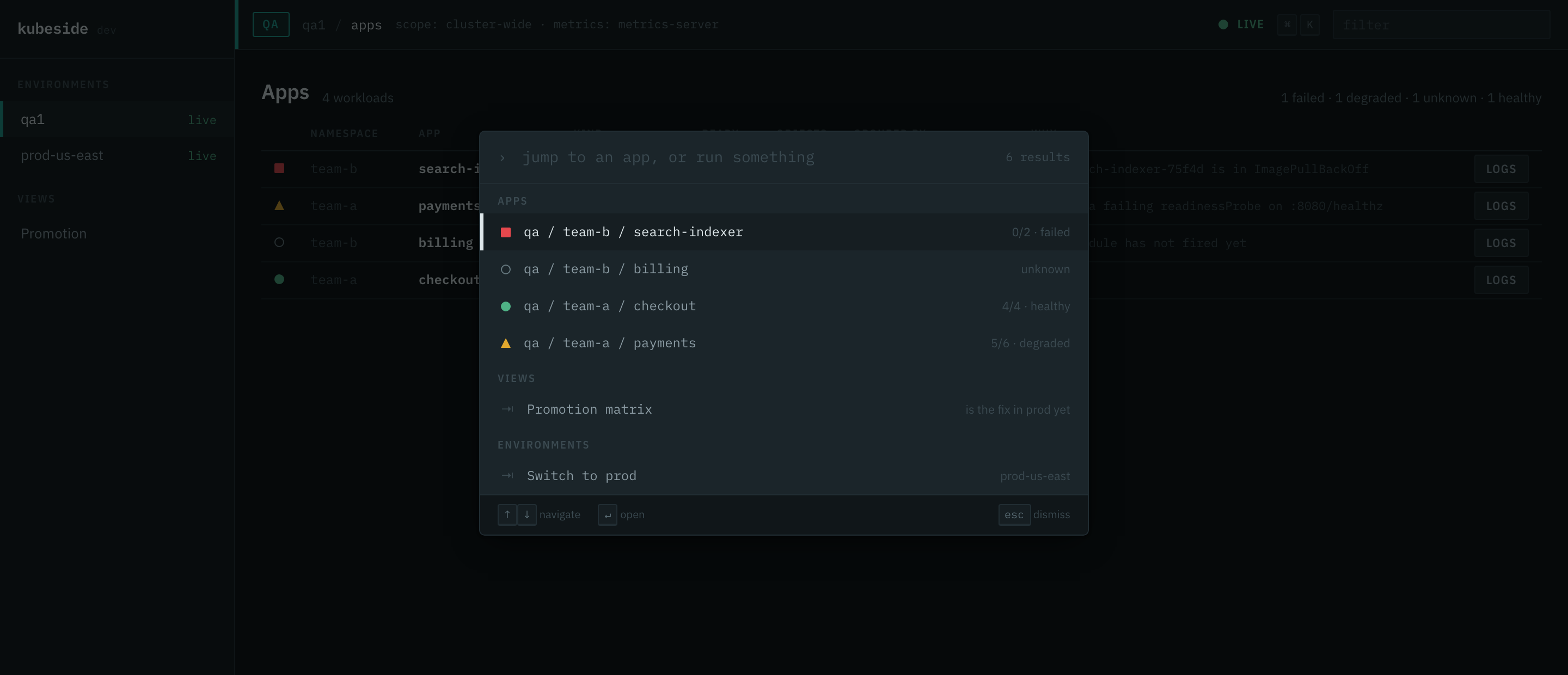
The palette
| Key | Does |
|---|---|
Cmd K / Ctrl K |
Open the palette. |
| type | Filter. Matching is subsequence-based: pay finds payments, tacheck finds team-a / checkout. |
↑ ↓ |
Move through results. |
Enter |
Run the selected command. |
Esc |
Close. |
An empty query lists everything, because the palette is also how you find out what the tool can do.
What it contains
- Apps — every app in the connected environment.
- Actions — logs, resolved configuration, timeline, and cross-environment comparison for whatever the current screen is about.
- Views — the promotion matrix.
- Environments — switch to another context.
- Settings — theme and text size, last so they are never in the way of reaching an app.
Only environments that are already connected contribute their apps. Searching every context in your kubeconfig would wake every cluster in it, which is exactly what the connection model exists to avoid.
Actions that need a target are only offered when there is one. A "tail logs" command with nothing selected is a command that cannot run.
Appearance
| Key | Does |
|---|---|
Cmd Shift L |
Cycle the theme: system, light, dark, back to system. |
Cmd Opt + |
Text one step larger. |
Cmd Opt - |
Text one step smaller. |
Cmd Opt 0 |
Text back to normal. |
Deliberately not Cmd + and Cmd -. Those are your browser's zoom, and zoom
scales the spacing grid along with the text, so it costs you rows. This scale
moves the type and the row height and leaves the grid alone. Use both: zoom the
window, size the type inside it.
Six steps, from 90% to 160%. The top of the range trades density for legibility on purpose: rows get taller, and on a dense screen the table becomes wider than the window and scrolls sideways. Nothing is cut off, and every column is still reachable.
The row height grows with the text, because a 34px row is the tightest one that fits the glyph and the mono cell it contains. Text that grew inside a row that did not would clip.
kubeside follows your desktop's light or dark setting until you pick one, and keeps following it, so a machine that switches at sunset takes kubeside with it. Picking a theme pins it. Cycling past dark returns you to following the system.
Both settings live in your browser's local storage. kubeside still writes nothing to disk, and they do not travel between browsers or between machines.